


Practice areas and how you work
Which matters you take on, consultation options, office locations and hours, from information you approve.
A chatbot on your firm's website that takes new enquiries in the format your team needs. It never gives legal advice.
Discuss your chatbot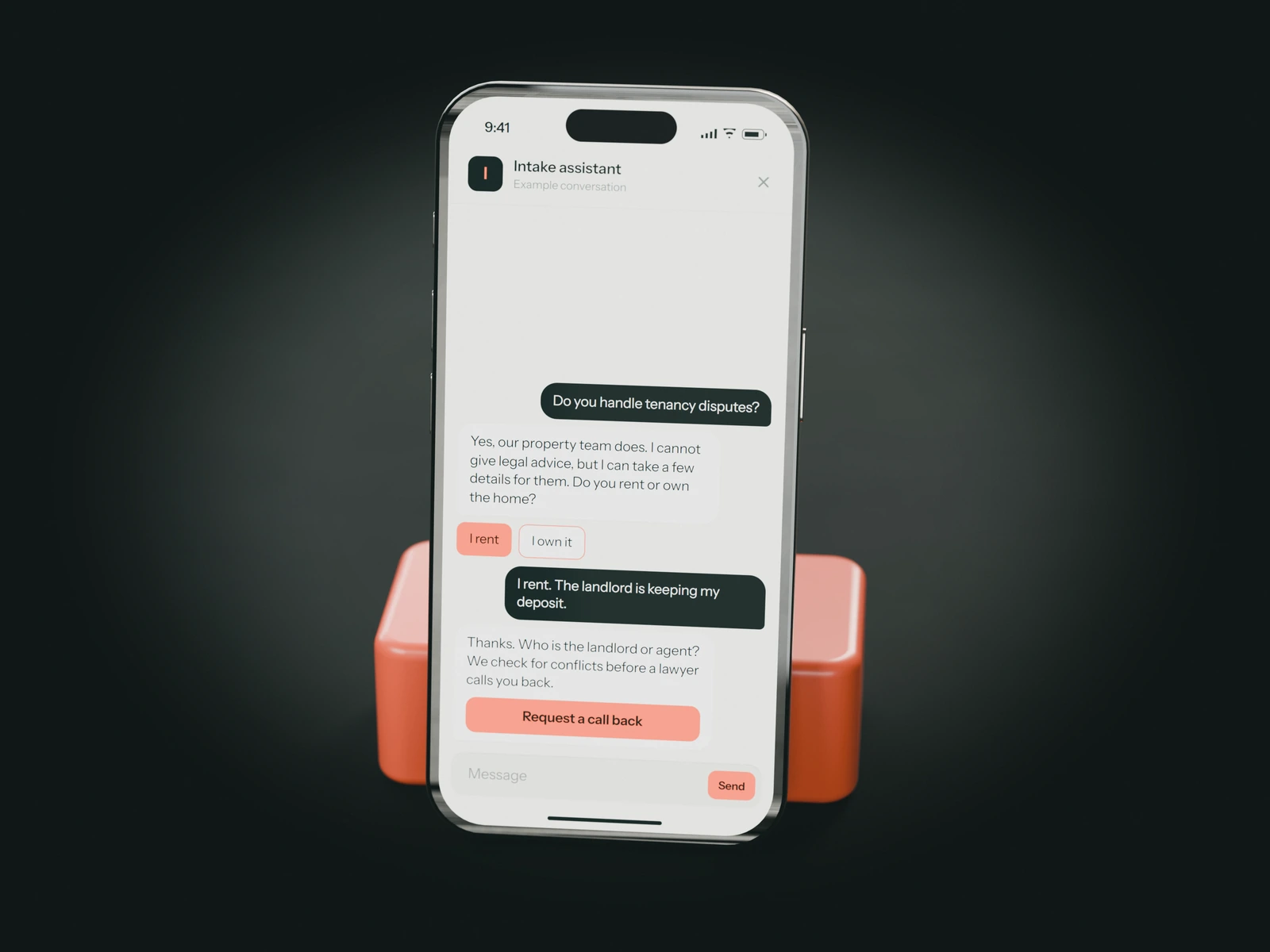
Whether you handle their kind of matter, how a first consultation works and what it costs, which documents to bring, where your offices are and whether someone can call them back today. Your website may cover some of it. The chatbot answers from the version you approve.
They arrive at all hours, often from someone who has just had bad news or a letter they do not understand.
What it may say is written down before we build.
Which matters you take on, consultation options, office locations and hours, from information you approve.
It asks the questions your team needs for a new enquiry: contact details, the type of matter, key dates and how the person found you. Your team gets a short summary instead of a chat transcript.
It can collect the names of other parties, so your team can run a conflict check before anyone discusses the matter.
When someone wants to speak to a lawyer, it takes a call-back request or sends them to your consultation booking page.
When a matter is outside your work, such as a criminal charge at a wills and property firm, it says so in its first reply and gives the referral you approve: a firm you trust, or a lawyer search run by the law society or bar association.
Once a consultation is booked, it sends the list for that kind of matter from your own checklists, such as the contract and dismissal letter for an employment claim or a list of what someone owns for a will, plus photo ID if you check it.
When a client writes to chase their lawyer, the chatbot looks nothing up. It takes their name, the matter reference if they have it and the message, and sends it to the lawyer on the matter, or to reception if it cannot tell who that is.
Sunday, 9.30pm. Someone was dismissed on Friday and wants to know before Monday whether the firm can help.
What your team gets. On Monday morning the employment team has a summary: employer and manager names for the conflict check, start and end dates, the time-sensitive flag and a call after 12. What happened at work waits for the lawyer's call.
It does not give legal advice, judge the strength of a case or tell anyone what to do. It can show the disclaimer your firm uses, for example that the chat does not create a lawyer-client relationship. These limits are tested before launch.
Each enquiry reaches the right person with the details filled in.
Summaries go to the right person, or into your case management system or CRM where its API allows. We check that before promising an integration.
A reminder when an enquiry has not been answered, a confirmation email with next steps and a daily list of new enquiries.
Next to the chatbot, these cover the steps between a first enquiry and an open matter.
New enquiries go first to whoever runs conflict checks, with the party names in the fields your conflicts search uses. The lawyer gets the full summary once the check is marked clear, and a check left untouched gets a reminder, the way enquiry follow-up chases unanswered enquiries.
When a lawyer accepts a matter, your engagement or client care letter goes out for e-signature with the link to your ID check, if you use one. An unsigned letter gets one reminder, then becomes a task for the lawyer to call.
When a lawyer declines an enquiry, or a conflict means the firm cannot act, the person gets your standard letter saying the firm is not acting, in your wording and without naming any conflict. A copy stays with the enquiry.
Once a matter is open, the client gets the document list for that kind of work with your secure upload link. Reminders stop when the documents arrive or the lawyer says so, and nothing is collected through the chat.
Clients get a reminder before a meeting or hearing with the time, the place or video link and what to bring, from the dates in your case management system where its API allows. Court deadlines stay in your own diary.
Law firm intake runs on rules, and we need yours in writing before the build.
The matters you take, the ones you turn away and where you send those, so the chatbot can say no in its first reply. A list or your website pages are enough.
The questions your team asks for each kind of matter, since a divorce and a commercial lease dispute need different first details. Your current intake form or call script works.
Which names your conflicts search needs, such as other parties, companies and former names, so they arrive ready to search, and who runs the check. A screenshot of the fields in your system is enough.
What the chat window should say about advice, confidentiality and your regulatory status, approved by a partner or your compliance officer. We use it word for word.
Who takes arrests, injunctions and short-notice hearings, and the number the chatbot should give outside office hours, as names, hours covered and numbers.
Real web and email enquiries with names taken out. We run them through the chatbot before launch to check each lands in the right practice area with the right questions.
The system enquiries should reach, such as Clio, Actionstep or LEAP, and an admin contact there, so we can check its API before promising a connection.
A law firm site needs these with or without a chatbot, and the chatbot answers from them.
Practice pages written around what the client faces, such as unfair dismissal or contesting a will, instead of one list of practice areas. People search for their problem, and a focused page gives the chatbot a clear answer to work from.
Each lawyer's areas of work, the year they qualified and how to reach them. Clients want to know who they will deal with, and the chatbot can name the right lawyer when it takes a call-back.
How you charge: fixed fees, hourly rates, a free or paid first meeting, no win no fee or legal aid. Firms regulated by the SRA in England and Wales must publish prices for some services, such as residential conveyancing and probate.
Who regulates the firm, your registration number and how to complain, with the SRA badge and Legal Ombudsman details for firms in England and Wales, or any notices your bar requires. The chatbot links here when asked.
A page to book a first meeting that says whether it is free or paid, how long it lasts and that a conflict check comes first. Where your booking tool takes payment, it happens there, never in the chat.
For crime, family or injunction work, an out-of-hours number at the top of every page, as a tap-to-call link on phones. The chatbot gives the same number when someone mentions an arrest or a hearing.
People write to a law firm in a bad week. In the first message they may name an abusive partner, describe an illness, admit a driving offence or explain their immigration status. Much of that is data the GDPR in Europe treats with extra care, and none of it is needed to arrange a first call.
So the chatbot asks only for intake details and asks people to keep the story for the lawyer. If someone types it out anyway, the chatbot does not repeat it or ask about it, and the summary your team receives notes that the chat holds more detail than intake needs.
Enquiries that never become matters are the awkward part, because the firm still holds names and a description of someone else's dispute. We set a retention period for them with you and limit who can open them, for example to the intake team, with transcripts kept in your case management system or a restricted inbox instead of a shared one.
No. It explains how your firm works and collects details for your team. Questions about someone's own situation go to a person.
It can say which practice areas you cover. Whether you take a matter stays your team's decision.
We agree it before the build: what is stored, where, for how long and who can see it. The chatbot asks only for what intake needs.
Yes. Evening and weekend enquiries are taken the same structured way and are waiting for your team in the morning.
No. It handles repeated questions and first details, so your team spends its time on the calls that need a person.
No. It collects the names in the format your conflicts search needs and sends them to the person who runs it. Running the search, judging a possible conflict and deciding whether to act stay with your team. Where your case management system has an API, the names can go straight into a new enquiry record.
It does not know who your clients are, so it treats everyone the same way: names first, a short description and no details. It never confirms whether you act for anyone. Your conflict check finds the clash, and your team sends your standard reply saying the firm cannot help.
Yes. Each area gets its own intake questions and its own destination, so a family enquiry reaches the family team and a lease dispute reaches property. When the area is unclear, it asks one sorting question, and if that does not settle it, the enquiry goes to general intake.
Not in the chat. It sends them to your booking page, and if your booking tool takes card payments, they pay there. The chatbot never asks for card details. It can explain what the fee covers, and whether it comes off later fees, if your fees page says so.
You do. Before launch we write the list with you, such as arrests, police interviews, injunctions or a hearing within a set number of days, and the number to give for each. We test it with real wording, because people describe urgency in their own words. See what a chatbot should hand over.
No. It can say whether you do legal aid work and in which areas, and link to an official eligibility checker where one exists. Whether someone qualifies depends on their finances and their case, and that is for your team to assess.
Send the questions your team asks new clients and where enquiries go now. The consultation is free, over Google Meet, a voice call or text.